

Table of Contents
Table of Contents
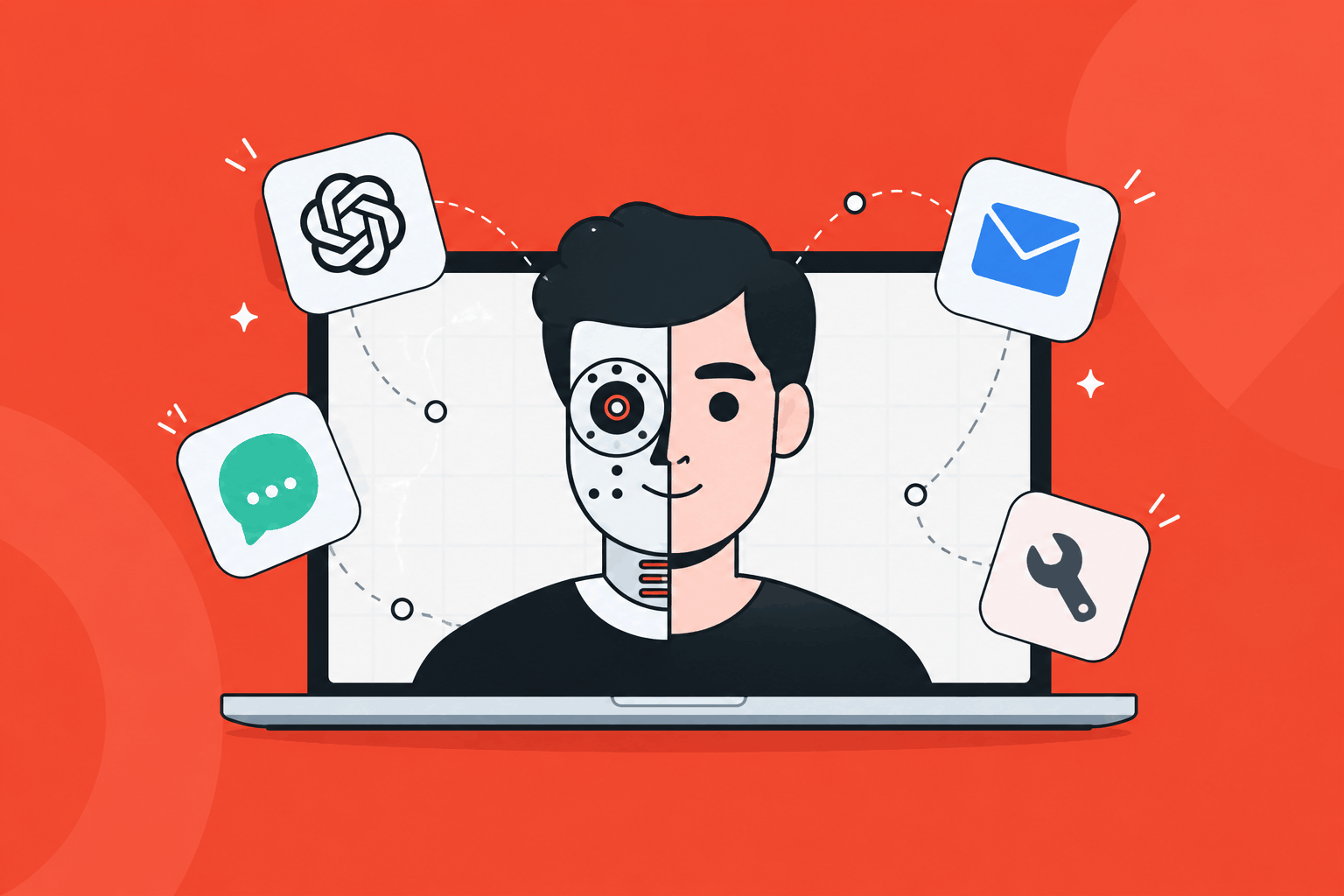
Your AI agent can write an email, summarize a report, or draft a response. But what happens when it needs to check a CRM, find an order, or trigger an action?
That is where the Model Context Protocol, or MCP, comes in. MCP for AI agents gives AI applications a standard way to connect with external data, tools, and services. Developers can use a shared protocol for exposing capabilities that an AI agent can discover and use.
This approach is useful as businesses move from simple chatbots toward autonomous, tool-using AI agents.
For businesses exploring AI automation, agents need more than good answers. They need useful information and, when permitted, useful actions. MCP for AI agents provides a way to connect AI agents with business applications and services. So, how can businesses use MCP to connect AI agents with their apps? Let’s break it down.
What Is MCP for AI Agents?
MCP for AI agents is based on the Model Context Protocol, an open standard that connects AI applications with the systems where business data and tools are stored. Anthropic introduced MCP in November 2024 to connect AI assistants with data sources, business tools, and development environments. Since then, MCP has expanded into a broader ecosystem for connecting AI applications with external capabilities.
The current MCP specification is dated July 28, 2026. The latest version introduced a stateless protocol core for remote deployments, support for longer-running tasks, and updated authorization requirements.
How Does MCP Work?
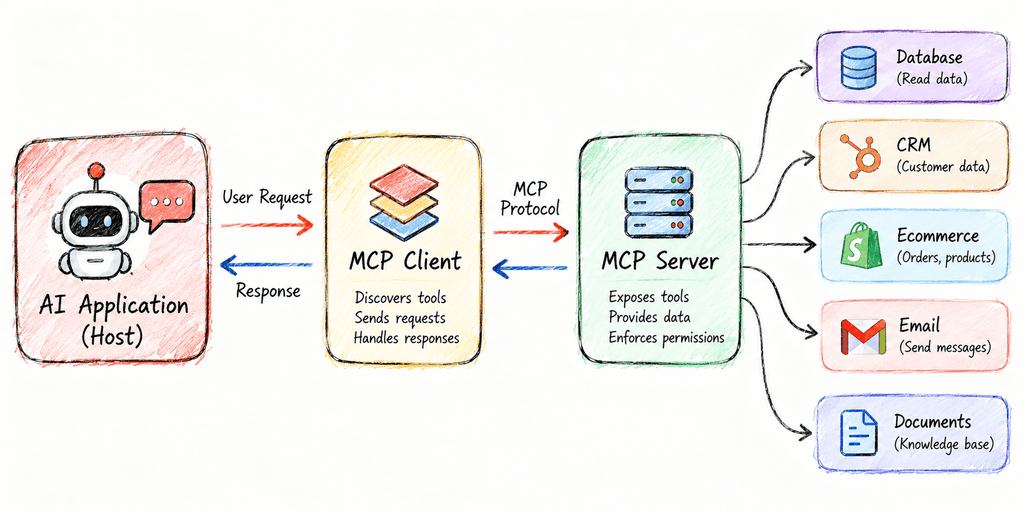
MCP for AI agents typically involves three parts:
| Component | What It Does |
|---|---|
| Host | The AI application that manages the user experience and coordinates connections |
| Client | The component that communicates with a particular MCP server |
| Server | The service that exposes data, tools, and other capabilities |
An MCP server can expose resources, tools, and prompts. Resources provide information for an AI application to read. Tools allow the model to request actions. Prompts provide reusable instructions or workflow templates.
Think of MCP for AI agents as a common language between AI applications and connected software. The business app still owns its data and logic, while MCP provides a standardized connection to selected capabilities.
Why Is MCP Important for Businesses?
Businesses often operate across many applications. A sales team may use a CRM, email platform, calendar, payment system, and reporting tools. A support team may need customer records, ticket history, order information, and internal documentation.
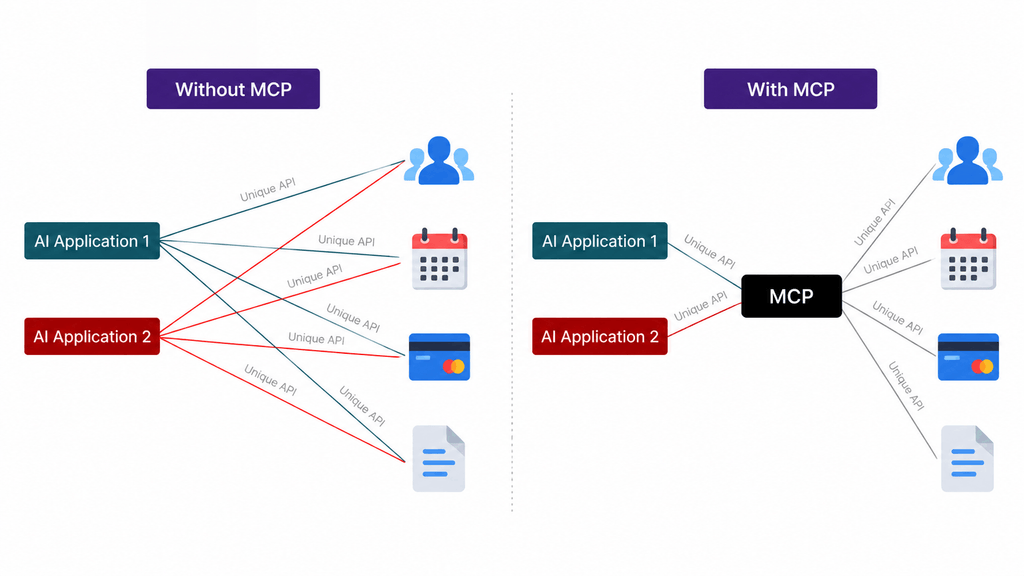
Without a common connection approach, AI projects can require custom work. MCP for AI agents can make connections more reusable through a standardized interface for discovering and calling tools. OpenAI added remote MCP support to its Responses API and listed integrations involving Shopify, Stripe, Twilio, HubSpot, and others.
MCP does not replace APIs. In many setups, an MCP server works as an AI-friendly layer over existing APIs, permissions, and business logic.
How Can Businesses Use MCP to Connect AI Agents With Their Apps?
1. Connect AI Agents to CRM and Sales Systems
A business can create or use an MCP server that exposes selected CRM functions to an AI agent. MCP for AI agents can allow the agent to retrieve a customer record, check lead information, update a permitted field, or support a follow-up workflow.
For example, a sales agent preparing for a customer call could access approved CRM information, summarize account history, review recent activity, and prepare talking points. If permitted, it could also record a follow-up task after the meeting.
The key is controlled access. The agent should receive only the tools and data needed for the workflow.
2. Connect AI Agents to Customer Support Platforms
Support teams can use MCP for AI agents to make customer service information available to AI agents through standardized tools.
An agent might retrieve support history, summarize conversations, look up order information, or prepare a response using connected systems. Microsoft documents MCP-based customer service capabilities for accessing customer service data and performing service operations through tools.
This can reduce manual searching while keeping the business application as the source of record.
3. Connect AI Agents to Ecommerce Platforms
Ecommerce companies have valuable information across products, inventory, customers, and orders. MCP for AI agents can expose selected ecommerce capabilities to an AI agent.
For example, an agent could check product availability, retrieve order details, answer a customer question using current information, or begin an approved workflow.
OpenAI’s remote MCP support has included examples involving Shopify and other business platforms, showing how AI applications can work with external services through MCP.
4. Connect AI Agents to Internal Knowledge and Documents
Businesses have information stored in documents, knowledge bases, databases, and internal applications. MCP for AI agents can expose approved resources so an AI assistant can retrieve relevant context when needed.
An internal agent could retrieve the latest policy, project details, product information, or operational data from a connected source instead of relying only on static chatbot information.
This can support employee assistants and internal operations.
5. Connect Multiple Apps to One AI Workflow
The value of MCP for AI agents becomes clearer when an agent needs more than one application.
Imagine an operations agent that checks a CRM record, looks up an order, sends a message, and creates a project task. Compatible MCP servers can present those capabilities through one standardized connection model.
The agent can select relevant tools, while connected systems enforce their rules and permissions.
6. Support Longer-Running AI Tasks
Some workflows cannot finish in one quick interaction. An agent may need to wait for an external process, collect additional information, or continue after the initial request.
The July 28, 2026 MCP Tasks extension supports asynchronous, longer-running operations by allowing a client to retrieve a later result. This makes MCP for AI agents useful for workflows that require more than a single real-time interaction.
Key Benefits of MCP for Businesses
- Standardized connections between AI applications and external tools.
- Reusable integrations for compatible AI clients.
- Better access to business context.
- More practical AI agents that can use approved tools.
- Flexibility as businesses add AI workflows.
These benefits make MCP for AI agents relevant for businesses looking to build connected and scalable AI workflows.
What Should Businesses Consider Before Using MCP?
MCP can connect powerful capabilities, so security should be part of the design from day one.
Businesses need to consider authentication, authorization, data access, tool permissions, user consent, and monitoring. The MCP ecosystem also highlights risks involving malicious tool descriptions, excessive permissions, and untrusted MCP servers.
A good implementation of MCP for AI agents should define which actions require user approval. Reading a customer record is different from sending a message, changing an order, or updating financial information.
How Should a Business Start With MCP?
Start with one clear workflow instead of trying to connect every application at once.
Choose a process where employees repeatedly move information between systems or search for data. Identify the resources and tools the agent needs. Then select an MCP server, connect the necessary systems, and test permissions before expanding.
MCP for AI agents is most useful when it solves a real operational problem. The technology should support the workflow.
Conclusion
MCP for AI agents is changing how businesses can think about connected AI. Instead of keeping an AI agent isolated inside a chat window, companies can give it structured access to approved data, tools, and services across their technology stack.
The opportunity is not simply connecting more apps. It is creating AI workflows that understand business context and interact with systems in a controlled way.
As MCP adoption grows, implementation quality will matter as much as the technology itself. Permissions, security, architecture, and workflow design should be core parts of the project. Organizations exploring MCP for AI agents should therefore trust a well-reputed digital solutions agency with proven experience in AI, integrations, automation, and business systems. The right partner can turn MCP into a secure, practical system for real operations.
FAQs
What does MCP stand for?
MCP stands for Model Context Protocol. It is an open standard designed to connect AI applications with external data and tools.
Is MCP the same as an API?
No. APIs provide ways for software systems to communicate, while MCP standardizes how AI applications can discover and interact with exposed tools, resources, and prompts.
Can MCP connect AI agents to business applications?
Yes. MCP for AI agents can provide AI applications with access to compatible business tools and data. Current examples include CRM, ecommerce, communication, and customer service use cases.
Does MCP replace APIs?
No. An MCP server can sit above existing APIs and business logic, providing an AI-friendly connection layer without requiring the underlying application to be rebuilt.
Is MCP secure?
MCP provides security and authorization mechanisms, but secure implementation still depends on authentication, permissions, data handling, configuration, and application design.
Do businesses need their own MCP server?
Not necessarily. A company can use an existing compatible server or build a custom MCP server for internal systems and specialized workflows.
What can an AI agent do through MCP?
Depending on the tools provided, an AI agent can retrieve information, search resources, call functions, and support approved actions across applications.
Why is MCP becoming important for AI agents?
AI agents become more useful when they access current business context and perform actions. MCP for AI agents provides a common way to expose those capabilities and extend workflows.