

Table of Contents
Table of Contents
Meta’s Muse AI agent can now connect with GoHighLevel, giving businesses another way to work with customer information, calendars, and sales processes without switching between systems for every task.
The useful question is what a business should actually let an AI agent do inside its CRM. That depends on its access, permissions, and the judgment each task requires.
On September 29, 2026, HighLevel announced its partnership with Meta for Muse connectivity. This is not a replacement for your CRM or an automatic upgrade to every workflow. It gives Muse a structured way to interact with authorized HighLevel functions. Here is what changed and how to approach it.
Quick Answer
The Meta Muse integration connects Meta’s AI agent to GoHighLevel through Model Context Protocol (MCP) and OAuth authorization. With approved access, Muse can use supported CRM operations to retrieve information and help with contacts, appointments, and opportunities. Start with read-only tasks, review permissions carefully, and keep a person involved when an action could affect customers or change important records.
What Is the Meta Muse Integration With GoHighLevel?
Muse is Meta’s AI agent for handling tasks that involve planning, gathering information, and working across connected applications. GoHighLevel, also called HighLevel, is used by businesses and agencies to manage leads, calendars, customer conversations, pipelines, and automated workflows.
The Meta Muse integration connects these systems through an official HighLevel app in Muse. Instead of copying customer information into an AI chat, an authorized agent can request information or use supported CRM operations through a structured connection.
According to HighLevel’s documentation, updated October 9, 2026, the integration supports more than 600 operations across 38 CRM domains through four unified MCP tools. That figure describes the integration overall, not unrestricted access. Actual capabilities depend on the selected sub-accounts and approved OAuth scopes.
For example, a business could approve contact lookups without permitting changes to records. Another may need calendar access for an appointment-related task. Permissions should follow the business need.
Why the Connection Matters Beyond Another AI Feature
A conventional CRM workflow is good at handling predictable events. Someone fills out a form, a confirmation email is triggered, an opportunity is created, and a sales representative receives a notification. Those preset steps make the process consistent.
An AI agent can help with a different kind of request. A manager might ask which prospects have consultations this week but incomplete contact details. Answering requires looking across records, comparing fields, and putting the findings into a useful order. With appropriate authorization, Muse may assist with that investigation.
This is the practical appeal of the Meta Muse integration. Staff can ask a question in plain language and, where supported, connect the response to CRM information and actions. It does not repair bad data or remove the need for established workflows. It offers another way to work with an existing system.
How MCP Makes the Integration Possible
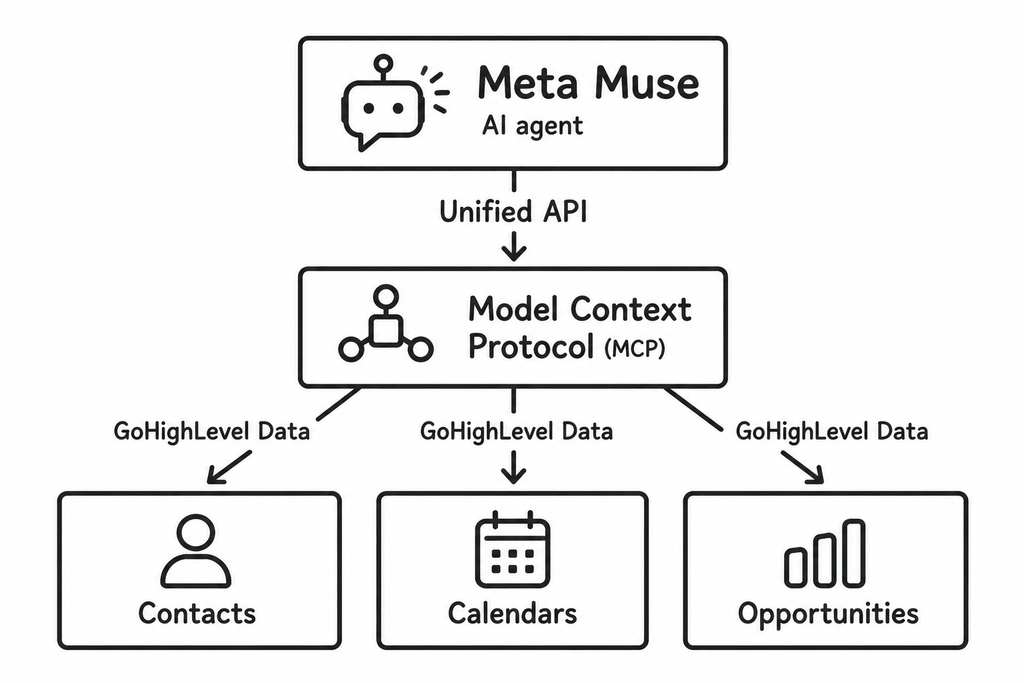
MCP stands for Model Context Protocol. It is a standard that lets an AI application discover and interact with tools provided by another service. For the Meta Muse integration, Muse acts as the AI client while HighLevel makes permitted CRM capabilities available through its MCP connection.
HighLevel uses OAuth for its dedicated Muse setup. A user signs in, chooses the CRM sub-account or sub-accounts, sees the permissions being requested, and authorizes the connection. This differs from some generic HighLevel MCP configurations that use a Private Integration Token.
Do not paste CRM passwords or private tokens into a chat. Use the official authorization process and check the requested scopes.
OAuth scopes are also different from ordinary HighLevel user roles. Scopes govern the access requested by the external app. User roles govern what someone can access inside a sub-account. An agency managing several client accounts needs to check both, because selecting the wrong sub-account could expose information that has nothing to do with the intended task.
7 Practical Use Cases for the Meta Muse Integration
The following examples build on capabilities described in HighLevel’s Muse announcement and MCP support documentation. They explain possible business applications, rather than promising that every workflow will work automatically in every account.
1. Find Leads That Need Attention
A sales manager might open HighLevel on Monday to find dozens of opportunities sitting in different stages. Some prospects asked for a callback. Others are waiting for a proposal. A few records are missing information that the team needs before reaching out.
Instead of reviewing each opportunity individually, the manager could use the Meta Muse integration to retrieve relevant records and prepare a list for review.
Someone on the team still decides which leads matter most and how to approach them.
2. Prepare Better for Sales Calls
A good sales call starts before the meeting. The representative needs to know what the prospect asked about, whether they have booked before, and what the team has already discussed.
With approved access, the Meta Muse integration could help prepare a short briefing from CRM records and any other connected tools it is permitted to use.
A well-written summary can still contain errors, so employees should check important claims against CRM records. A briefing saves time only when it improves preparation without creating false confidence.
3. Support Appointment Coordination
Calendars are another useful area. HighLevel lists calendar services within its MCP coverage, and the company specifically mentions booking meetings and coordinating schedules through Muse.
Through the Meta Muse integration, an authorized agent might help an employee check appointment details, understand available options, or coordinate a booking. Actual actions depend on the supported operation and the access granted during setup.
Don’t overlook the ordinary details. Time zones, staff availability, meeting length, and booking rules can create problems even with a sophisticated agent. Test the process with a small number of appointments before depending on it for customer scheduling.
4. Improve CRM Data Quality
Messy CRM data makes almost every sales process harder. Missing phone numbers, inconsistent service categories, and unassigned leads can undermine reports and automated follow-ups.
The Meta Muse integration may help staff identify information gaps or propose corrections using supported contact and custom-field operations. For instance, a manager could request a list of leads missing an owner rather than editing them all at once.
Similar names do not always indicate duplicate contacts, and older entries are not necessarily wrong. Review suggested edits, test a small sample, and confirm the outcome inside HighLevel before considering broader changes.
5. Review Sales Pipeline Bottlenecks
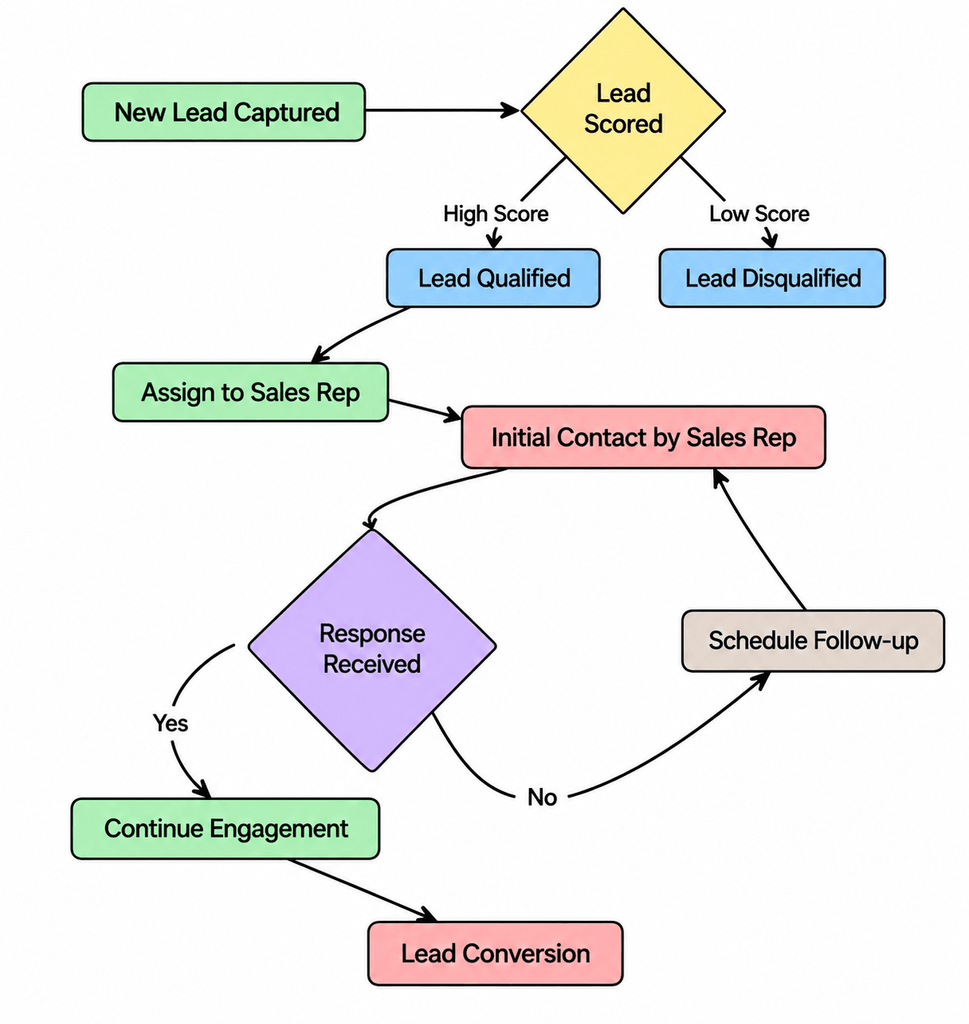
A crowded pipeline can look healthy while concealing neglected opportunities. Some records have not moved because the prospect needs more time. Others are stuck because nobody followed up.
Using authorized opportunity data, the Meta Muse integration could help organize a review of stalled records. A useful question would specify which pipeline to inspect and what “stalled” means, perhaps no recorded activity for ten business days.
Be careful with the conclusions. A missing CRM update does not prove that an employee ignored a customer. The agent can flag patterns worth investigating; a manager needs the wider context to understand why they occurred.
6. Assist With Customer Conversations
Drafting responses is often a reasonable first step for AI-assisted customer service. An employee could use the Meta Muse integration to review the latest inquiry, gather relevant CRM context, and suggest an appropriate reply.
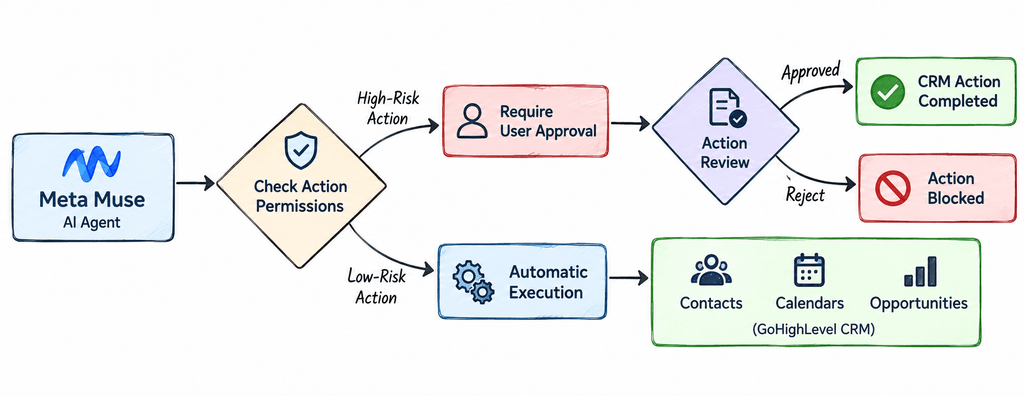
However, drafting and sending are different actions. Meta states in its Muse for Small Business announcement that nothing publishes, sends, or spends without user approval. Businesses should preserve that approval step and still check consent, opt-outs, channel requirements, and message accuracy.
An AI-generated message can be fluent and still promise something the company cannot deliver. Customer-facing communication deserves an actual review, particularly when pricing, scheduling, or complaints are involved.
7. Create More Useful Operational Summaries
Managers often need answers that sit somewhere between a quick CRM search and a full reporting project. Which opportunities have no owner? What appointments are coming up? Which records need a closer look?
A carefully scoped use of the Meta Muse integration could help turn accessible CRM records into a brief summary, separating what the CRM shows from what the agent recommends checking next. That distinction makes the output easier to trust.
A summary should specify its date range and limitations. If the agent could access only one sub-account, the report should not sound as if it covers the entire agency. A narrow but accurate picture is more valuable than a confident overview built on incomplete data.
How to Connect Muse to GoHighLevel
HighLevel provides a dedicated connection guide. The exact interface may evolve, but the documented process is straightforward:
- Open Muse and find the option to connect an app or MCP service. Select the official HighLevel app.
- If prompted for the endpoint, use https://services.leadconnectorhq.com/mcp/muse/v2/.
- Begin authorization and sign in through HighLevel’s official OAuth screen.
- Select the intended CRM sub-account or sub-accounts, confirming that you are in the correct client environment.
- Read the requested OAuth scopes. Approve only what the planned task requires.
- Complete authorization, return to Muse, and confirm HighLevel appears as connected.
- Test a low-risk request, such as retrieving an authorized contact, before considering any record changes.
This dedicated connection does not require a Private Integration Token. HighLevel also documents how to review connected applications under Settings > Connected Apps, where access can be revoked when no longer needed.
Check what the agent can actually see. Verify an authorized test record in HighLevel and document who approved the scopes.
What Muse Should Not Control Without Review
When using the Meta Muse integration, start with searching, reading, and summarizing. Keep higher-risk actions subject to human approval, even when the integration technically supports them.
This matters most when customer information is involved. CRM records can contain personal details, private conversation history, and payment-related information. A company should assess its privacy obligations and the connected provider’s data-handling terms before authorizing access to sensitive material.
Avoid instructions such as “clean up our whole database” or “handle every lead.” A better request names a pipeline, a date range, the fields to inspect, and the desired output. It should also say what the agent must not change. Specificity does not eliminate errors, but it makes unexpected results easier to recognize.
Does Muse Replace Existing GoHighLevel Automation?
No. This distinction matters when evaluating the Meta Muse integration. HighLevel already has workflows, Conversation AI, Voice AI, and other built-in tools for specific business processes. You do not need an external agent to handle every reminder, form submission, or routine lead assignment.
Traditional automation is usually preferable when the same trigger should reliably produce the same result. A booked appointment can generate a confirmation. A missed call can start an approved follow-up workflow. These are repeatable processes with clear rules.
The Meta Muse integration fits better when someone needs an assistant to investigate information, coordinate a limited task, or work across connected systems. The two approaches can complement each other: workflows handle predictable events, while a properly authorized agent helps employees deal with questions and exceptions that do not fit neatly into a fixed rule.
How Businesses Can Evaluate the Integration’s Value
Choose one narrow task before rolling the Meta Muse integration out across a team. Document how long it takes today, how often it occurs, and which errors regularly need fixing. Then run a supervised comparison using comparable records and an agreed review process.
Useful measures include preparation time, accuracy of retrieved information, number of manual corrections, and whether the employee still has to repeat the work. A demonstration alone does not establish a productivity gain. If a summary saves five minutes but requires ten minutes of checking, the process needs work.
For agencies using the Meta Muse integration, evaluating each client environment separately is essential. Permissions, approved actions, test records, and a rollback procedure should belong to the specific account. A successful internal trial does not automatically establish that the same setup is appropriate for every client.
Final Thoughts
For companies already using GoHighLevel, the sensible next step with the Meta Muse integration is to choose one recurring problem, check the supported permissions, and test the results with a person in control. That offers a clearer route to useful AI-powered CRM automation than connecting everything and hoping an agent will work it out.
Businesses that need help connecting AI agents, improving GoHighLevel workflows, or structuring CRM automation can work with a digital solutions company to build a system around their actual processes.
Frequently Asked Questions
Is the Meta Muse integration officially available?
Yes. HighLevel announced Muse connectivity on September 29, 2026, and documents HighLevel as an official app inside Muse. Which actions are available depends on the connected sub-account and approved OAuth scopes.
Can Muse update contacts and opportunities in HighLevel?
HighLevel’s MCP server supports retrieving and updating records through authorized operations. A particular change through Muse must also be supported by the integration and allowed by the relevant scopes. Connecting the app does not permit editing everything.
Is the Meta Muse integration the same as a Meta ads integration?
No. Muse is an AI agent connected to business applications. The HighLevel connection does not automatically set up advertising campaigns or replace an ad-management platform. Review ad-related permissions and features separately.
Is it safe to connect client CRM accounts?
The connection provides OAuth scopes and sub-account selection, but the organization remains responsible for making sensible access decisions. Approve the minimum necessary permissions, review relevant data-handling requirements, check outputs, and revoke access when it is no longer needed.