

Table of Contents
Table of Contents
Businesses have spent years using artificial intelligence to write emails, summarize meetings, and answer questions. Those tools can be useful, but a person still has to decide what happens next. The emerging shift is different: AI systems are beginning to carry out connected tasks, not merely suggest how to complete them.
That is the promise of Agentic AI. A sales agent might research an incoming lead, check a customer relationship management (CRM) record, propose the next action, and prepare a follow-up for approval. The value is not another chatbot. It is reducing the manual handoffs between decisions and execution.
Yet autonomy brings new risks. An agent that can update a database can also update the wrong record. This guide explains what AI agents really do, where businesses can use them today, and how to introduce them without surrendering control.
Quick Answer
Agentic AI describes AI systems that pursue a defined goal by choosing steps, using tools, interpreting results, and adapting within set boundaries. Traditional AI tools typically respond to individual requests. Agents can coordinate a sequence of activities, sometimes across multiple applications, while asking for human approval when needed.
For most businesses, the immediate opportunity is not an entirely autonomous company. It is a carefully supervised agent handling a narrow, repetitive process such as qualifying inquiries, preparing customer responses, or routing support tickets. Start with limited permissions, measurable goals, and a clear way to escalate exceptions.
What Is Agentic AI, and How Is It Different From Regular AI?
A conventional generative AI assistant creates an output: a draft, an answer, an image, or a summary. Someone then reviews it and completes the remaining work. Agentic AI introduces a controlled ability to act. Instead of stopping at “Here is an email you could send,” an agent may retrieve the relevant account history, draft the message, and queue it in the CRM for approval.
There is no single universally accepted boundary between an AI assistant, an automated workflow, and an agent. Anthropic’s engineering guidance distinguishes predefined workflows from systems that let a model dynamically direct its own process. That distinction is more useful than product labels: ask what decisions the model makes, which tools it can use, and who authorizes consequential actions.
AI Tools vs. AI Agents vs. Traditional Automation
| Capability | AI tool | Rule-based automation | AI agent |
|---|---|---|---|
| Main behavior | Produces a response | Follows programmed conditions | Selects actions toward a goal |
| Adapts to unexpected input | Can answer flexibly | Usually needs new rules | Can revise steps within limits |
| Works across business systems | Only with configured access | Through configured integrations | Through authorized tools and integrations |
| Typical example | Summarizes a lead inquiry | Sends an email when a form arrives | Classifies an inquiry, checks CRM context, and prepares a tailored next step |
These categories overlap. An agent often relies on ordinary automation for dependable execution. Agentic AI should add judgment where rigid rules struggle, not replace every reliable workflow with probabilistic decision-making.
How Do Autonomous AI Agents Actually Work?
An effective agent normally combines a language model, instructions, access to relevant context, tools, and a control mechanism. A useful way to understand Agentic AI is as a repeated cycle:
- Receive a goal. For example, identify which open support requests need escalation.
- Retrieve context. Read permitted tickets, policies, and customer history.
- Decide the next step. Compare each case with the business’s routing criteria.
- Use an authorized tool. Tag a ticket, propose a response, or assign a queue.
- Check the result. Verify the update succeeded and stop or escalate if it did not.
This is not unrestricted independent thinking. Developers define what the agent can access, when it must stop, and whether a person must approve a tool call. OpenAI’s agent-building guidance emphasizes tool design, guardrails, and human intervention.
Consider a service business receiving an appointment request with incomplete details. A normal chatbot might ask a question. An agent could check available services and calendar openings, request the missing information, and prepare a booking. Confirmation and any sensitive changes can still require explicit permission. That limited autonomy is often enough to make Agentic AI useful.
Where Can Agentic AI Deliver Practical Business Value?
The best applications involve several small decisions, scattered information, and repeated handoffs. The following are realistic implementation scenarios, not claims that every platform offers these features out of the box.
1. Customer Support and Service Operations
A support agent can categorize an incoming message, retrieve an approved policy, check the customer’s order status, and draft a response. Straightforward questions may be resolved automatically where company policy allows. Refund disputes, identity concerns, and emotionally sensitive cases should be routed to a person.
Here, Agentic AI is most valuable when it shortens resolution time without sacrificing accuracy. A good deployment records which sources informed the response and makes escalation easy for customers and staff.
2. Sales Qualification and CRM Follow-Ups
Imagine a new inquiry entering a CRM after a consultation form submission. An agent can identify the requested service, check for duplicate contacts, review prior interactions, and propose the right follow-up. A separate workflow can send a reviewed message at an appropriate time.
For agencies and service providers, Agentic AI can help maintain consistent lead handling. However, outreach permissions, unsubscribe requests, and message frequency should be enforced through deterministic rules rather than left to a model’s judgment.
3. E-Commerce and Order Assistance
An online store may receive questions about product compatibility, delivery status, and returns. With authorized catalog and order access, an agent can locate relevant products, verify current information, and explain available options.
An Agentic AI application should not guess inventory or promise a refund based on outdated text. Prices, stock, eligibility, and transaction status need to come from live systems. High-value purchases and financial changes deserve explicit approval.
4. Internal Operations and Project Coordination
Teams frequently move information between emails, forms, project boards, and shared documents. An agent could read an approved project update, identify missing deliverables, create draft tasks, and flag blockers for a manager.
This is a sensible starting point for Agentic AI because errors can often be reviewed before they reach customers. Still, project owners must control what gets assigned or published, and agents should not quietly invent deadlines.
5. Finance and Administrative Work
An agent might match invoice details with purchase records, identify missing fields, and prepare exceptions for an accountant. It can help assemble evidence, but final payment authorization, tax judgments, and changes to bank details should remain under stronger controls.
For these functions, Agentic AI works best as a supervised assistant that organizes decisions rather than independently making high-stakes commitments.
What Makes Agentic AI Work With Existing Business Software?
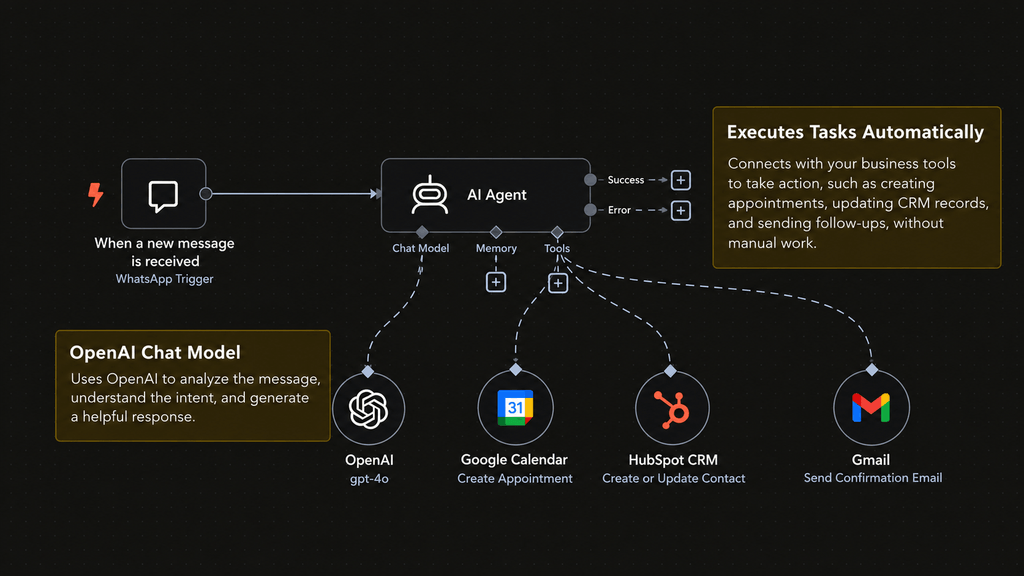
An AI model alone cannot update your CRM or read a private order database. It needs permitted connections, typically through application programming interfaces (APIs), integration platforms, or purpose-built tools. These connections determine whether an agent can only read information or can also create and modify records.
CRM, Scheduling, and Automation Platforms
An implementation might connect a CRM such as GoHighLevel with forms, calendars, email, and ticketing software using supported APIs, webhooks, or middleware such as n8n, Make, or Zapier. Exact capabilities depend on the product, subscription, integration method, and permissions.
A practical architecture often combines Agentic AI for interpreting messy requests with predictable automation for sending approved messages, enforcing schedules, and preventing duplicate actions. Separate the agent’s recommendation from the system that executes a transaction.
MCP and Agent-to-Agent Communication
The Model Context Protocol (MCP) provides a standard way for AI applications to connect with external tools and data sources. The Agent2Agent (A2A) protocol addresses communication between separate agents. They solve different problems and do not automatically make an integration safe.
Most smaller organizations do not need a network of specialist agents to begin. One well-scoped Agentic AI workflow with reliable data access is usually easier to test, explain, and maintain than a complicated multi-agent system.
Benefits of Agentic AI, and When It Is Not the Right Choice
The potential advantages include less manual copying between systems, faster handling of routine requests, more consistent use of approved information, and better visibility into stalled work. Agentic AI may also assist outside standard office hours, provided escalation and customer expectations are clearly managed.
Those outcomes are not guaranteed. The total cost includes model usage, integrations, testing, monitoring, employee training, and recovery from errors. Poor customer data can undermine an otherwise capable agent. More autonomy can even increase costs if a task requires repeated model calls or extensive review.
Use rules-based automation for stable, predictable tasks such as sending a confirmation after a verified form submission. Avoid giving Agentic AI independent authority over payroll, legal conclusions, healthcare decisions, bank transfers, or irreversible customer actions. The sensible question is not “Can an agent do this?” but “Can it do this reliably under business controls?”
The Biggest Risks of Agentic AI and How to Control Them
An AI tool that provides a flawed suggestion can waste time. An agent with write access can also create a real operational problem. The OWASP Top 10 for Agentic Applications 2026 is a useful reference for identifying agent-specific security concerns.
Prompt Injection and Untrusted Information
An attacker can hide instructions in an email, website, or document that an agent reads. If those instructions influence tool use, the agent may take an unauthorized step. Treat external content as data, not as commands. Validate structured fields before using them in sensitive workflows, and test adversarial examples.
Excessive Permissions and Data Exposure
An agent needs the least access required for its job. A support assistant that only checks shipment status should not receive unrestricted account-editing or payment permissions. Restrict access by role, use secure authentication, and avoid placing confidential records into unnecessary prompts. These practices are central to responsible Agentic AI deployment.
Errors, Repeated Actions, and Missing Oversight
Models can misunderstand context, select the wrong tool, or repeat an action after a timeout. Use validation, spending and action limits, duplicate-prevention controls, transaction identifiers, and audit logs. Make retries safe and provide a reliable pause or shutdown mechanism.
NIST’s AI Risk Management Framework provides a broader approach to governance and evaluation. For Agentic AI, organizations should document who owns each workflow, which decisions require human approval, and how incidents will be investigated. Human oversight is not a temporary inconvenience. It is part of the operating design.
How to Introduce Agentic AI Into Your Business
A successful rollout begins with the business process, not the newest platform. Here is a manageable approach to adopting Agentic AI without building more technology than you need.
Step 1: Identify a Specific Process
Choose work that happens frequently, has clear outcomes, and currently requires people to consult multiple sources. Support-ticket triage or CRM lead classification are stronger pilot candidates than an undefined goal such as “automate sales.” Map the current steps and note where judgment is actually required.
Step 2: Prepare Reliable Data and Access
Clean up duplicate records, document policies, confirm system ownership, and map the required APIs. Determine what the agent may read, what it may draft, and what it may change. If the underlying CRM data is unreliable, fix that before introducing Agentic AI.
Step 3: Build the Smallest Useful Workflow
Begin with one agent and a limited set of tools. Require approval for outgoing messages, record deletions, payments, and other consequential actions. Keep routine validation and business rules outside the model whenever possible. A narrow workflow is easier to debug than a fully autonomous operation.

Step 4: Test Realistic Cases Before Launch
Evaluate ordinary cases, ambiguous requests, missing data, tool failures, duplicate submissions, and malicious instructions. Confirm that the agent declines or escalates tasks beyond its authority. OpenAI’s evaluation documentation describes tracing and test-based assessment that can help teams spot workflow failures.
Step 5: Launch Gradually and Review Results
First run Agentic AI in observation mode, where it recommends actions without executing them. Then permit low-risk actions for a small group, with logs and a designated owner reviewing mistakes. Expand only when tests and real-world performance justify broader access. Changes to prompts, models, tools, or business policies require renewed testing.
How Should You Measure Agentic AI ROI?
Avoid judging Agentic AI by the number of tasks it attempts. Measure completed outcomes against the existing process. Useful metrics include time to resolution, accurate routing rate, number of human corrections, escalation quality, cost per completed task, and customer satisfaction.
For example, compare one month’s support-triage results with a similar baseline period. Account for integration fees, model usage, supervision time, and any new error-recovery work. A workflow that finishes quickly but creates more incorrect CRM records is not a productivity improvement. Reliable Agentic AI should reduce total effort while preserving service quality.
Final Thoughts
The revolutionary shift is not that AI can answer better questions. It is that Agentic AI can help businesses move from an instruction to a verified action across connected systems. That opportunity is real, but so are the risks of poor data, excessive permissions, and unchecked automation.
Start with one measurable process, keep humans responsible for important decisions, and expand autonomy only as reliability improves.
For AI-powered CRM automation and integrations, work with a trusted and experienced digital solutions company that understands your processes as well as your technology.
A capable partner can connect the right systems, establish safeguards, and build an automation strategy around measurable business needs.
Frequently Asked Questions
Is Agentic AI the same as generative AI?
No. Generative AI primarily creates content or responses. Agentic AI uses AI capabilities to select and carry out steps toward a goal, usually through connected tools. Many agents rely on generative models, but the concepts are not interchangeable.
Can AI agents work without human supervision?
Some can execute approved low-risk steps without asking each time. That does not mean they should operate without monitoring, boundaries, and accountability. The degree of autonomy depends on the task, system permissions, and consequences of failure.
Does a small business need custom AI agents?
Not necessarily. Small businesses can often start with existing CRM workflows, support automation, or a narrowly configured agent built using available integrations. Custom development makes more sense when the process involves unusual data, complex decisions, or systems without suitable connections.
What is the difference between an AI chatbot and an AI agent?
A chatbot primarily holds a conversation or provides information. An agent can additionally use authorized tools to progress a task. However, a chatbot with tool access may also qualify as an agent, so compare actual capabilities rather than marketing names.
Will Agentic AI replace employees?
Agentic AI can change the amount and type of routine work people do, but its effect on jobs depends on the organization and how the technology is deployed. Employees remain important for judgment, customer relationships, exception handling, and accountability. The strongest early use cases support staff rather than assuming people are unnecessary.
How long does it take to implement an AI agent?
There is no universal timeline. A narrowly scoped workflow using clean data and existing integrations may be simpler than an agent spanning several legacy systems. Security reviews, approval requirements, testing, and ongoing maintenance matter more than a vendor’s fastest demonstration.